was webkit2 in both tests?
The “out of the box” was using webkit, which worked fine. Webkit2 on the same installation was laggy.
I have since learned that webkit2 is not actually a different codebase, if I understand correctly. It’s just a different API into the webkit API that results in a different process model.
While I was waiting for the Pi Zero to collect better metrics so I can directly compare kweb/webkit/gtk3/buster with kweb/webkit2/gtk3/buster, I decided to make another edition of kweb that is kweb/webkit/gtk4 (upgrading to gtk4 was not my idea, but it seemed to be required by the newer version of webkit).
I’ll spare everyone the details, because the punchline is that it had a 5 second lag even on the Pi Zero 2. This is better than the 20 seconds I was seeing before on the Zero 2 (with kweb/webkit2/gtk3), but still not good enough. And if it was that bad on the Zero 2, it’s only going to be worse on the Zero.
For anyone who is curious, I also had to upgrade to bookworm to run this test and the code is published here:
Metrics
Also, here are the metrics from various systems and it’s clear that memory usage is a problem and perhaps the only problem. All of these were taken on a Pi Zero.
Buster / kweb (gtk3/webkit)
pi@raspberrypi:~ $ uname -a
Linux raspberrypi 5.10.103+ #1529 Tue Mar 8 12:19:18 GMT 2022 armv6l GNU/Linux
pi@raspberrypi:~ $ free -h; uptime; date
              total        used        free      shared  buff/cache   available
Mem:          430Mi       307Mi        49Mi       4.0Mi        72Mi        68Mi
Swap:          99Mi        40Mi        59Mi
 14:15:11 up 16:26,  1 user,  load average: 2.02, 2.01, 2.02
Sat 17 Jun 14:15:11 BST 2023
pi@raspberrypi:~ $ top -o +%MEM | head -n 12 | tail -n 6
  PID USER      PR  NI    VIRT    RES    SHR S  %CPU  %MEM     TIME+ COMMAND
  457 openhab   20   0  365588 230928   5648 S   0.0  52.4  47:27.61 java
 1818 root      20   0  267236  54696   9228 S  14.3  12.4 159:58.97 kweb
  801 root      19  -1  118780  12420   3872 S   4.8   2.8  47:15.31 Xorg
   92 root      20   0   26712   7052   6728 S   0.0   1.6   0:09.94 systemd-journal
26509 root      20   0   12180   6264   5464 S   0.0   1.4   0:00.40 sshd
Buster / kweb (gtk3/webkit2)
pi@raspberrypi:~ $ uname -a
Linux raspberrypi 5.10.103+ #1529 Tue Mar 8 12:19:18 GMT 2022 armv6l GNU/Linux
pi@raspberrypi:~ $ free -h; uptime; date
              total        used        free      shared  buff/cache   available
Mem:          430Mi       309Mi        24Mi       0.0Ki        95Mi        70Mi
Swap:          99Mi        84Mi        15Mi
 16:20:11 up 18:40,  1 user,  load average: 3.17, 2.89, 2.92
Thu 15 Jun 16:20:11 BST 2023
  PID USER      PR  NI    VIRT    RES    SHR S  %CPU  %MEM     TIME+ COMMAND
  459 openhab   20   0  373408 224568   5732 S   0.0  51.0  53:19.63 java
 2199 root      20   0  343368  78144  24320 S  69.6  17.7 936:29.54 WebKitWebProces
 2181 root      20   0  211984   9976   7204 S   0.0   2.3   6:53.41 kweb
 2197 root      20   0  252584   8924   5432 S   0.0   2.0   0:06.42 WebKitNetworkPr
  773 root      19  -1  111256   6328   3504 S   0.0   1.4  26:31.00 Xorg
Bullseye / kweb (gtk3/webkit2)
pi@raspberrypi:~ $ uname -a
Linux raspberrypi 6.1.21+ #1642 Mon Apr  3 17:19:14 BST 2023 armv6l GNU/Linux
pi@raspberrypi:~ $ free -h; uptime; date
               total        used        free      shared  buff/cache   available
Mem:           429Mi       264Mi        67Mi       0.0Ki        97Mi       114Mi
Swap:           99Mi        83Mi        16Mi
 17:39:33 up 19:57,  1 user,  load average: 4.12, 3.16, 3.03
Wed 14 Jun 17:39:33 BST 2023
OK, I have a new configuration which is looking promising on the performance front. It’s bullseye with the old kweb from Buster. I just copied over the executable and all the libraries it needed that were missing and after 16 hours the LCD screen is responsive to taps.
Metrics
The metrics actually don’t look that great with only 14Mi of swap space free, but the load averages are pretty much identical to the 1.3-dev image (Buster). The important thing is that it is responsive to the user’s taps.
pi@raspberrypi:~ $ uname -a; free -h; uptime; date; top -o +%MEM | head -n 12 | tail -n 6
Linux raspberrypi 6.1.21+ #1642 Mon Apr  3 17:19:14 BST 2023 armv6l GNU/Linux
               total        used        free      shared  buff/cache   available
Mem:           429Mi       265Mi        67Mi       0.0Ki        97Mi       114Mi
Swap:           99Mi        85Mi        14Mi
 16:51:12 up 16:15,  1 user,  load average: 2.03, 2.04, 2.04
Mon Jun 19 16:51:12 BST 2023
  PID USER      PR  NI    VIRT    RES    SHR S  %CPU  %MEM     TIME+ COMMAND
  518 openhab   20   0  365548 218180   5216 S   5.0  49.6  46:27.50 java
 1744 root      20   0  304116  32704  10608 S  15.0   7.4 164:05.57 kweb
  106 root      20   0   45712   6788   6488 S   0.0   1.5   0:02.62 systemd-journal
  787 root      19  -1  190168   6504   3444 S   5.0   1.5  50:36.35 Xorg
    1 root      20   0   33772   4792   3552 S   0.0   1.1   0:10.13 systemd
If someone can reproduce my test results, it’d make me feel better about this possible solution.  Please post your results back here, be they good or bad. If you run into any issues, let me know and I’ll do my best to help get things sorted out.
I don’t have a new image, but below are the instructions on how to get this configuration set up:
- Flash the 1.4-dev build 5851 to an SD card: Artifacts · bullseye_hestiapi_ansible (#5815) · Jobs · hax0rbana_public / raspberrypi-automation · GitLab
- Put it in your test HestiaPi and set up wifi access for your network as usual
- SSH into your test setup and run the following:
        wget https://hax0rbana.org/mirror/webkit-old.tar.xz
        tar -Jxf webkit-old.tar.xz
        sudo ./webkit-old.install
        sudo shutdown -r now
The stress test I’ve been using has been to make sure the cooling is eternally turned on so the cooling and fan icons stay flashing constantly. I just set the cooling set point to something very low and since it’s a test setup and not actually controlling my HVAC, it’ll just stay in the cooling state forever.
As long as the UI is always at least as responsive as the 1.3-dev (buster) image, I would consider this new configuration to have passed the test. The memory and CPU usage is interesting, but the functionality is the only thing that really matters.
I am most interested in testing on the Raspberry Pi Zero W. This is the hardware that is in virtually all of the existing HestiaPi thermostats and so I want to make sure it works there.
Testing on the Zero 2 is optional, but it should go at least as well as, if not better than, the original Pi Zero.
1 Like
@hestia_hacker Just so you know you are not talking into the dark working on deploying your build and running a 24H test.
1 Like
@hestia_hacker, I have a question. With the 1.4dev 5815 images deployed and did the webkit-old deployment. When I started things up, I saw that the animation was on when I clicked on the fan button. Is that correct, or should the animations be removed?
Yeah, the animations should be there whenever the related relay is closed (the fan in your example).
I like the animations, plus it keeps the UI consistent from one version to the next, and this configuration seems to be able to handle them so  .
.
Ok cool just wanted to make sure I was testing the correct thing.
I am gathering stats right now with this script
Stat gathering script
#!/bin/bash
#--------+---------+---------+---------+---------+---------+---------+---------+
#Author:       Joel B Carver
#E-mail:       ed1023@gmail.com
#Version:      1.0.4
#Date:         01-Aug-2022
#Last Update:  20-Jan-2023
#File name:    get_stats.sh
#Purpose:      The purpose of this script is to generate stats about a system
#              and log to file.
#-------------------------------------------------------------------------------

#-------------------------------------------------------------------------------
# Define Variables
#-------------------------------------------------------------------------------
ALL_STATS_FLAG=off
RAW_BATT_FLAG=off
CPU_USAGE_FLAG=off
CPU_TMP_FLAG=off
WIFI_SIGNAL_FLAG=off
MEMORY_USED_FLAG=off
SWAP_USED_FLAG=off
STD_OUT_FLAG=on

SLEEP_TIME=15

declare -A STAT_DATA

CSV_LOG_HEADER=off
FOUT="stats.log"

#*******************************************************************************
#* void plog($int, $string)
#*------------------------------------------------------------------------------
#*DESCRIPTION:
#*           general log function used for all other logging
#*INPUT:
#*           $int -> exe_code -> info code based on return codes
#*                -> 0 => [ OK ]
#*                -> 1 => [FAIL]
#*                -> 2 => [info]
#*                -> 3 => [warn]
#*                -> 4 => [Dbug]
#*           $string - string to be outputted
#*OUTPUT:
#*           $string => std out
#*******************************************************************************
plog()
{
  exe_code=$1
  in_str=$2

  if [ "$STD_OUT_FLAG" = "on" ]; then

    verb_str=`date "+%Y-%m-%d %H:%M:%S"`

    #Build exe_code string and add it to log strings
    if [ "$exe_code" -eq 0 ]; then echo -e "${verb_str} \e[1m[ \e[32mOK \e[0m\e[1m]\e[0m ${in_str}"; fi
    if [ "$exe_code" -eq 1 ]; then echo -e "${verb_str} \e[1m[\e[31mFAIL\e[0m\e[1m]\e[0m ${in_str}"; fi
    if [ "$exe_code" -eq 2 ]; then echo -e "${verb_str} \e[1m[\e[36mINFO\e[0m\e[1m]\e[0m ${in_str}"; fi
    if [ "$exe_code" -eq 3 ]; then echo -e "${verb_str} \e[1m[\e[33mWARN\e[0m\e[1m]\e[0m ${in_str}"; fi
    if [ "$exe_code" -eq 4 ]; then echo -e "${verb_str} \e[1m[\e[35mDBUG\e[0m\e[1m]\e[0m ${in_str}"; fi

  fi

}

#*******************************************************************************
#* void csvlog($int, $string)
#*------------------------------------------------------------------------------
#*DESCRIPTION:
#*           general log function used for all other logging to csv vile
#*INPUT:
#*           csv string to log
#*OUTPUT:
#*           $string => log file
#*******************************************************************************
csvlog()
{
  outstr=`date "+%Y-%m-%d %H:%M:%S"`
  if [ "$CSV_LOG_HEADER" = "off" ]; then
    csvheader
    CSV_LOG_HEADER="on"
  fi

  for key in "${!STAT_DATA[@]}"; do
    outstr+=", ${STAT_DATA[$key]}"
  done

  echo $outstr >> $FOUT

}

#*******************************************************************************
#* void csvheader()
#*------------------------------------------------------------------------------
#*DESCRIPTION:
#*           general log function used to write the headers for the csv file
#*INPUT:
#*           global key value pair array
#*OUTPUT:
#*           $string => log file
#*******************************************************************************
csvheader()
{
  headerstr="Date/Time"
  for key in "${!STAT_DATA[@]}"; do
     headerstr+=",$key"
  done
  echo "${headerstr}" >> $FOUT
}

#*******************************************************************************
#* void fulload()
#*------------------------------------------------------------------------------
#*DESCRIPTION:
#*           Function to load the cpu top 100%
#*******************************************************************************
fulload()
{ # If your version of busybox does not include getconf that add the yes line
  # for as many cores as you want peg out
  #for i in $(seq $(getconf _NPROCESSORS_ONLN)); do yes > /dev/null & done
  yes > /dev/null &
  yes > /dev/null &
}

#*******************************************************************************
#* void get_stats()
#*------------------------------------------------------------------------------
#*DESCRIPTION:
#*           Function to get the stats we want
#*DevNote:
#*           To add a new stat just add a if statement to the function and add
#*           it to the STAT_DATA array of key value pairs
#*INPUT:
#*           Uses global flags to check what stat we need to gather
#*OUTPUT:
#*           Key value pair
#*           $key -> $string => column header
#*           $value -> $string => value to be logged
#*
#*******************************************************************************
get_stats()
{
  #if [ "$RAW_BATT_FLAG" = "on" ] || [ "$ALL_STATS_FLAG" = "on" ]; then
    #DevNote: Works on some devices but not all devices
   # STAT_DATA['Raw Battrey Value']=$(cat /sys/bus/i2c/devices/0-0036/iio\:device0/in_voltage0_raw)
  #fi
  if [ "$RAW_BATT_FLAG" = "on" ] || [ "$ALL_STATS_FLAG" = "on" ]; then
    STAT_DATA['CPU % Usage']=$((100-$(vmstat 1 2|tail -1|awk '{print $15}')))
  fi
  if [ "$RAW_BATT_FLAG" = "on" ] || [ "$ALL_STATS_FLAG" = "on" ]; then
    # This gets cpu temp in mill C than converts it to C only in
    STAT_DATA['CPU Temp C']=$(( $(cat /sys/class/thermal/thermal_zone0/temp)/1000  ))
  fi
  if [ "$WIFI_SIGNAL_FLAG" = "on" ] || [ "$ALL_STATS_FLAG" = "on" ]; then
    # DevNote: this gets info for current wifi might have to change link
    STAT_DATA['WIFI SIGNAL dBm']=$(iw wlan0 link | grep signal | awk {'print $2'})
  fi
  if [ "$MEMORY_USED_FLAG" = "on" ] || [ "$ALL_STATS_FLAG" = "on" ]; then
    STAT_DATA['Memory Used']=$(free -h | grep Mem: | awk {'print $3'})
  fi
  if [ "$SWAP_USED_FLAG" = "on" ] || [ "$ALL_STATS_FLAG" = "on" ]; then
    STAT_DATA['Swap Used']=$(free -h | grep Swap: | awk {'print $3'})
  fi

}

#*******************************************************************************
#* void help()
#*------------------------------------------------------------------------------
#*DESCRIPTION:
#*           Function to list help text
#*OUTPUT:
#*           stdout -> text on how to use this script
#*
#*******************************************************************************
help()
{
  echo -e "\e[1mUsage\e[0m"
  echo " -a  -> Turn on all stat. flags "
  echo " -b  -> Turn on battery stat. gathering"
  echo " -c  -> Turn on CPU stat. gathering"
  echo " -w  -> Turn on wifi stat. gathering"
  echo " -m  -> Turn on memory stat gathering"
  echo " -n  -> Turn on swap memory stat gathering"
  echo " -s  -> Turns off std output"
  echo " -i  -> Changes the log interval number is in seconds"
  echo " -f  -> Change log file default stat.log"
  echo ""
}

#main script functions
#evaluate command line agrs

echo -e "\e[1mUsage Notes\e[0m"
echo " - Default log time interval 15 sec can be changed with option -i num"
echo " - Default log path ${FOUT} changed with option -f path"
echo " - -h for more usage notes"
echo " - to cancel Ctrl+c"
echo ""

#DevNote: using this if statment to check of any options were entered
if [ "$#" == 0 ]; then
  ALL_STATS_FLAG=on;
  plog "2" "No options entered Default setting all stats to on"
fi

while getopts abcswmi:f:h opt;
  do
    case "$opt" in
    a) ALL_STATS_FLAG=on;;       #Turn on all stat flags
    b) RAW_BATT_FLAG=on;;        #Turn on battery stat. gathering
    c) CPU_USAGE_FLAG=on         #Turn on CPU stat. gathering
       CPU_TMP_FLAG=on;;
    w) WIFI_SIGNAL_FLAG=on;;     #Turn on wifi stat. gathering
    m) MEMORY_USED_FLAG=on;;     #Turn on memory stat gathering
    n) SWAP_USED_FLAG=on;;       #Turns off std output
    s) STD_OUT_FLAG=off;;        #Turns off std output
    i) SLEEP_TIME=$OPTARG;;      #Changes the log interval
    f) FOUT=$OPTARG;;            #Change log file
    h) help
       exit 1;;
    ?) #unknown flag
       echo "options: abcswmi:f:h"
       exit 1;;
    esac
  done

while true
  do
    get_stats
    outstr=' '
    for key in "${!STAT_DATA[@]}"; do
      outstr+="$key:${STAT_DATA[$key]} "
    done
    plog "2" "${outstr}"
    csvlog
    sleep $SLEEP_TIME
  done
Ran with options:
~$ get_stats.sh -i 1 -a
6 hours in, and touch is still responsive here are the stats I am seeing
Without animations running
2023-06-20 21:14:00 [INFO] Memory Used:253Mi Swap Used:75Mi CPU Temp C:32 WIFI SIGNAL dBm:-65 CPU % Usage:80
2023-06-20 21:14:03 [INFO] Memory Used:253Mi Swap Used:75Mi CPU Temp C:32 WIFI SIGNAL dBm:-67 CPU % Usage:19
2023-06-20 21:14:05 [INFO] Memory Used:253Mi Swap Used:75Mi CPU Temp C:32 WIFI SIGNAL dBm:-67 CPU % Usage:2
2023-06-20 21:14:07 [INFO] Memory Used:253Mi Swap Used:75Mi CPU Temp C:32 WIFI SIGNAL dBm:-67 CPU % Usage:2
With animations running
2023-06-20 16:06:10 [INFO] Memory Used:257Mi Swap Used:36Mi CPU Temp C:32 WIFI SIGNAL dBm:-72 CPU % Usage:60
2023-06-20 16:06:12 [INFO] Memory Used:257Mi Swap Used:36Mi CPU Temp C:32 WIFI SIGNAL dBm:-72 CPU % Usage:15
2023-06-20 16:06:15 [INFO] Memory Used:257Mi Swap Used:36Mi CPU Temp C:32 WIFI SIGNAL dBm:-71 CPU % Usage:22
2023-06-20 16:06:17 [INFO] Memory Used:257Mi Swap Used:36Mi CPU Temp C:33 WIFI SIGNAL dBm:-72 CPU % Usage:75
2023-06-20 16:06:19 [INFO] Memory Used:257Mi Swap Used:36Mi CPU Temp C:32 WIFI SIGNAL dBm:-73 CPU % Usage:22
2023-06-20 16:06:22 [INFO] Memory Used:257Mi Swap Used:36Mi CPU Temp C:32 WIFI SIGNAL dBm:-71 CPU % Usage:17
2023-06-20 16:06:24 [INFO] Memory Used:257Mi Swap Used:36Mi CPU Temp C:31 WIFI SIGNAL dBm:-71 CPU % Usage:24
2023-06-20 16:06:27 [INFO] Memory Used:257Mi Swap Used:36Mi CPU Temp C:32 WIFI SIGNAL dBm:-71 CPU % Usage:16
2023-06-20 16:06:29 [INFO] Memory Used:257Mi Swap Used:36Mi CPU Temp C:32 WIFI SIGNAL dBm:-73 CPU % Usage:25
Side Note: I am using the best sd card I can get my hands on with an A2 rating 64GB SD card
24-hour update:
The system seems to be stable, and the touch screen seems to be responsive. There was one time when I saw the CPU spike to 100 for more than 2 sec. it lasted about 10 sec. This was when two animations were activated the touch screen did not respond when this happened, after both animations were up and running touch came back and is responsive after the animations started up and have been running for about the last 16 hours.
Otherwise, resource usage remains consistent with my 6-hour post.
P.S. If you want the full stats.log csv I can post it but for now, the highlights seemed enough.
Cool. I’ll see about getting that into the build scripts so we can test out an image that is configured like this straight out of the box. It’ll likely be a few days before that’s ready.
After trying the latest image I had to apply again the same configuration to make my LCD touch working
But I noticed this issue (Generic, non-HVAC and Celsius)
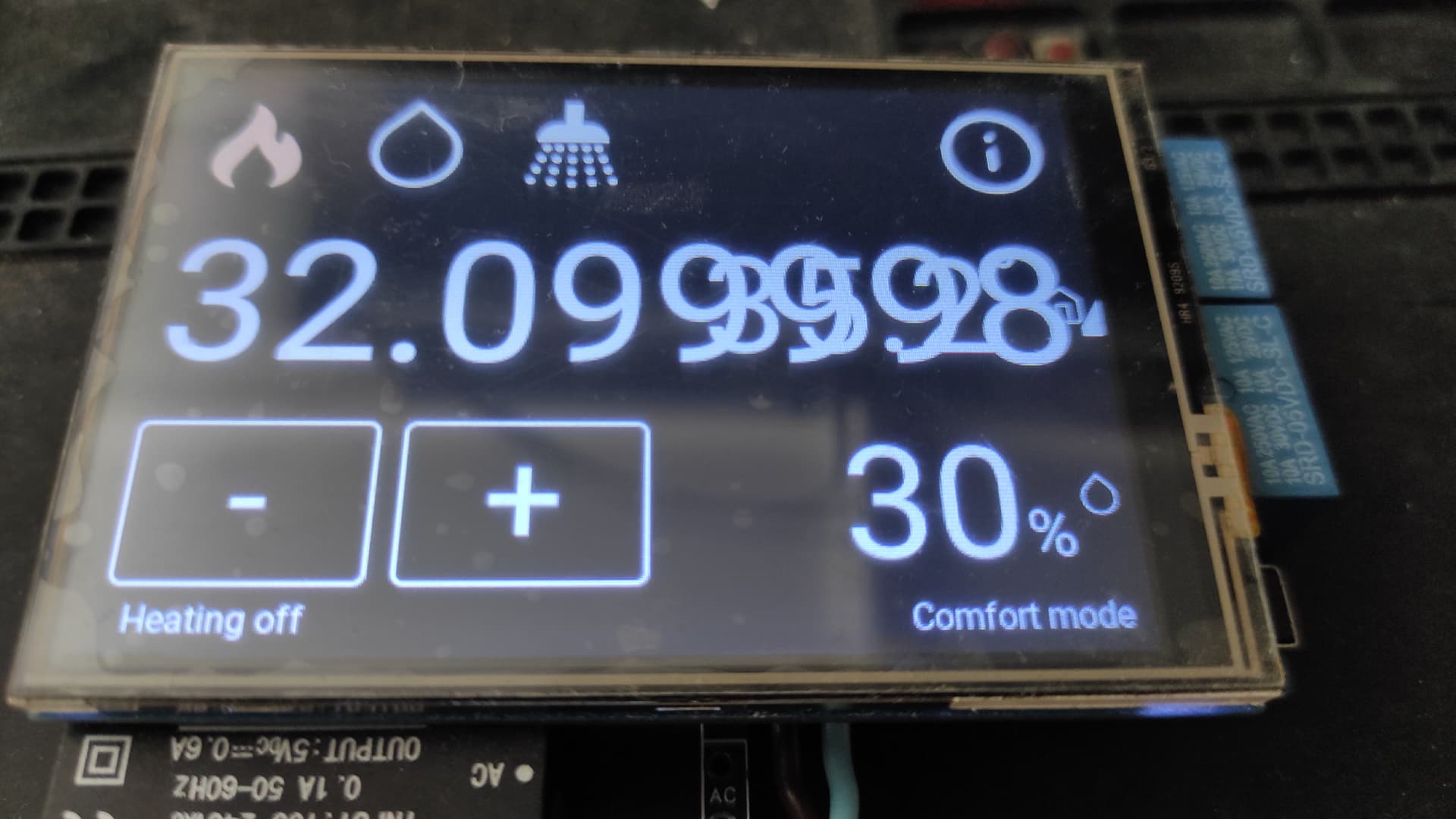
Could it be that?
Glad to hear @ed1023 is able to reproduce my results.
I was able to reproduce the rounding issue @HestiaPi showed in their photo. This is good, as it will allow me to determine whether changes I make have fixed it. After reproducing the issue, if I just switch from Celsius to Fahrenheit there is no rounding error. If I switch back to Celsius, there’s still no rounding error. Now I am not able to recreate the issue.
I don’t think it’s related to the try/catch because that’s about reading sensor values and the issue is on the set point value. I expect the issue to be in the “Turn everything off and switch SystemType” section of the “SystemType changed” rule, but I haven’t been able to confirm that yet. Other places is could be include “Initialization”, “Heating/Cooling Check”, “Heating Control”, or “TempUnit changed”. I’ll track it down, but it’ll take a bit since I currently need to reflash a card and switch to Generic mode in order to recreate the issue.
I also have a proper image to test now, rather than having to go through the steps to set it up. It will still have this rounding issue when in Generic mode and using Celsius, but other than that it should be good to go.
Unimportant side notes:
- @HestiaPi is it really 35C in your house?!
- Does generic mode (aka EU mode) not have any cooling?
- Why would anyone want to turn off their hot water? Is that just for when going on vacation?
This is something that worried me a bit… test device is laying flat on a desk so passive cooling is less effective but I did notice it was warm. Will test further. Also Greek Summer is here and the room was shut most of the day.
Yes, EU mode has no cooling (otherwise it would be an HVAC  )
)
Mediterranean areas use solar (free) heating for water. That translates to about 6-7 months boiling hot water and the rest of the year warm or cold if no sun is out.
I will try the HVAC mode with Celsius to see if the rounding error is there too.
I’ve flashed several SD cards now and have not been able to trigger the bug again. If you can find a reliable way to trigger it, I’m very interested in knowing how.
It may be a timing issue. The one time I did trigger it, I switched from HVAC to generic and then changed to Celsius before it rebooted. Doing the what I believe is the exact same thing I did before doesn’t trigger it now.
While I was digging through the code, I did find an error related to the temperature set points, but I don’t think it is causing the display/rounding issue. However, I did submit a pull request to get it fixed none-the-less.
Deep dive into the code
I looked through the code to see if I could find anything that might help me determine how to recreate the issue. If you’re going to follow along, you’ll also want to know about the defaults.js file.
- f1849091-6ac9-4e2f-ad46-eba679edf633: Switches units from F to C or C to F. Set the heating set point (MinTempSetpoint) to C_MIN_DEF or F_MIN_DEF. Seems fine.
- 32223121-5acf-423f-a9f5-1dffbe665927: Initialization routine. Also sets heating set point to default and seems fine
- 09f7d047-1650-4995-8add-e554f6bdddf6: Switch system type (e.g. HVAC to Generic). Sets MinTempSetpoint to C_COMFORT_DEF or F_COMFORT_DEF if in comfort mode (which the default). This seems wrong, but I don’t see how it would result in the rounding issue. I think it should be setting the MinTempSetpoint to C_MIN_DEF or F_MIN_DEF like the rules above
- bb0b73b3-a99b-4f57-b441-e0265c37813a: Prevent the minimum set point from being equal to or above the maximum. In this case it’s not the action that sets the heating temperature, but rather the third condition. This will not fix a weird rounding error, but as long as the values are at half or full degrees, it should not create the issue either.
Cool to hear about the solar hot water being popular over in the Mediterranean. 35C seems like the kind of environment where you’ve certainly want to have cooling in your climate control system! 
Hopefully you’ll be able to figure out how to reliably trigger this bug. If so, I’ll be curious to see if it also happens on the 1.3 or possibly even the 1.2 image and it’s just rare enough that we never randomly ran into it.
I built a new image with the aforementioned bugfix:
I haven’t tested this one yet, but I don’t expect it will address the rounding/display issue. Everything is the same except one tiny change to the rule that switches system types (Generic and HVAC).
I’ve been testing with build 6038 and unable to trigger any issues (display bugs or otherwise). I’d like to propose this image as the official 1.4-dev image.
I am not aware of any issues that can be reproduced by multiple people. The issues I am aware of:
- @HestiaPi’s LCD screen requires different settings (also an issue on the 1.3-dev image)
- An issue with the set point being a number that is a non whole nor half number and the display being messed up as a result. This has only been seen in Generic mode, using Celsius, can not be reliably reproduced, and AFAIK has never been reproduced on build 6038
If anyone who has tested it can chime in and confirm or correct the statements above, it’d be appreciated.
If accepted, this would get us on the latest version of Raspberry Pi OS (they have not yet released a bookworm image), which would be a beautiful milestone for me personally, as it’s something I have been working on for more than a year!
1 Like
@hestia_hacker I will give it a test try to have results by this weekend.
@hestia_hacker I was looking over the bme280 script and it is possible to display several decimal points after temp and humidity.
pi@raspberrypi:~ $ scripts/bme280C.py
Chip ID     : 96
Version     : 0
Temperature :  20.87 C
Pressure :  980.266632351 hPa
Humidity :  64.3063976228 %
If you modify the script like this it will prevent it from ever allowing more than 1 or 2 decimals.
  print "Temperature : ", round(temperature,1), "C"
#  print "Temperature : ", round(((temperature*1.8)+32),1), "F"
  print "Pressure : ", round(pressure,2), "hPa"
  print "Humidity : ", round(humidity,1), "%"
After code change
pi@raspberrypi:~ $ scripts/bme280C.py
Chip ID     : 96
Version     : 0
Temperature :  20.9 C
Pressure :  980.15 hPa
Humidity :  64.0 %
It’s desirable to have the full resolution of the current temperature and humidity in the bme280*.py scripts. This allows people who want the extra resolution to see it (with some UI modifications).
It was the temperature set point that was having the issue with more than one decimal place.
I’m not sure how they got set to something other than a whole or half number, nor how that number was being displayed with more than one decimal place, because the OpenHAB “item” is defined as being just one decimal point for Celsius (and zero for Fahrenheit). If we can find a way to reliably reproduce the issue, I’m sure I can figure it out and get it fixed though.
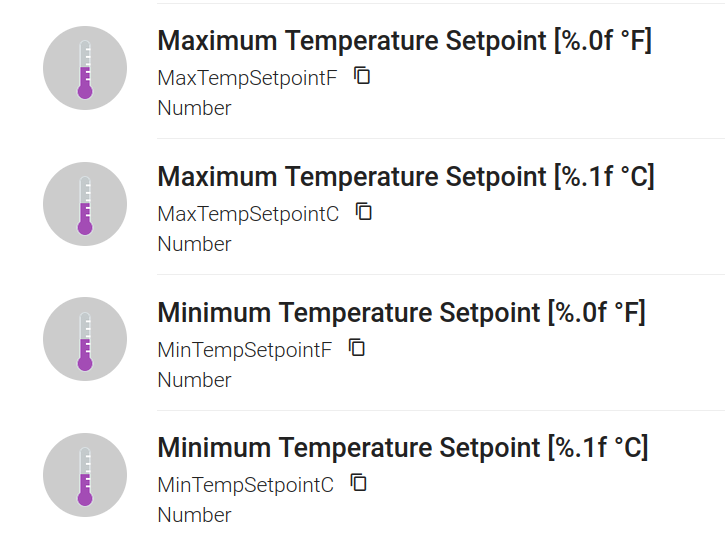
Here is what I put together to add decimal point to the F side. It modifies the UI and openhab. It also changes the setpoints.